

What is BungeeCord?
18 February 2026
BungeeCord is a system that allows you to connect multiple Minecraft servers into a single network. In this article, we explain what BungeeCord is and what it can be used for.
💡 Note: For simplicity, we use the term BungeeCord in this article, but the information also applies to alternatives like Velocity, Waterfall, and FlameCord.
What exactly does BungeeCord do?
BungeeCord acts like a traffic controller for your Minecraft servers. It is not a normal server you can play on, but a proxy that automatically directs players to other servers within your network. This makes it possible to connect multiple servers—for example, a survival server, a minigame server, and a lobby, into one network.
Switching between servers
One of the biggest advantages of BungeeCord is that players can switch between different servers within a network without manually reconnecting. This makes it feel like they are playing on one large, connected server, while behind the scenes multiple separate servers are running. Switching servers can be done in various ways, such as using commands, portals, or interactive menus.
An example
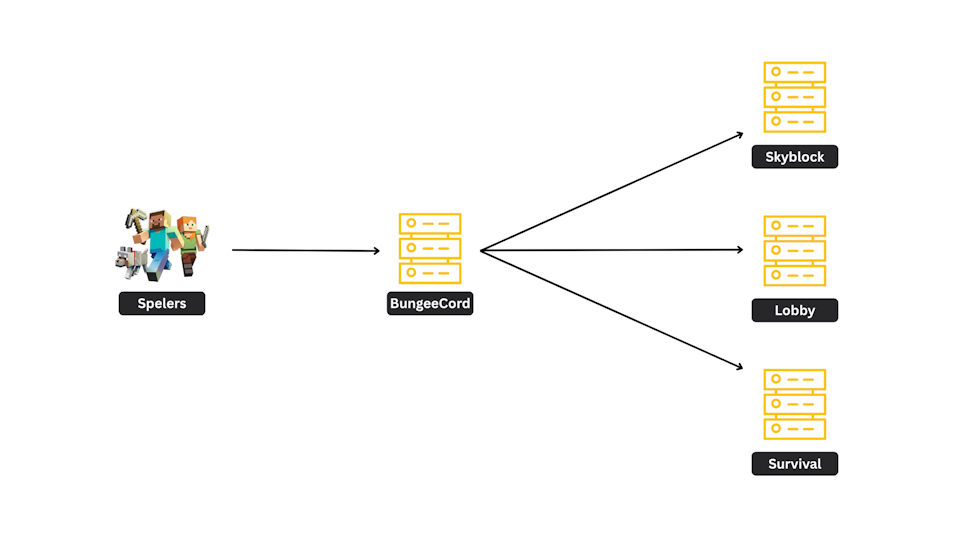
In the example below, we have a BungeeCord network with three connected servers: Lobby, Skyblock, and Survival. Players connect to the BungeeCord server and are immediately redirected to one of the servers within the BungeeCord network.
Why use BungeeCord?
BungeeCord is a useful solution if you want to combine multiple worlds or gamemodes within a single server environment. The main benefits are:
Scalability: you can easily add new servers to your network.
Efficient management: each gamemode runs on its own server, allowing you to optimize performance for each gamemode and maintain the network more easily.
Seamless switching: players don’t notice when switching between servers, making it feel like a single, unified server.
What do you need to use BungeeCord?
To set up a BungeeCord network, you need:
At least 3 servers: one server runs BungeeCord itself, and the other servers are the actual servers players will play on (for example, Skyblock and Survival).
Paper or Spigot: the connected Minecraft servers must be based on Spigot or Paper to work properly with BungeeCord.
I want a BungeeCord server, what’s next?
If you’re excited and want to set up your own BungeeCord network, you can easily do this with CheeseHosting Minecraft packages!
👉 Order your Minecraft package here!
Already have a Minecraft package?